teaching-materials
Database
A database is a structured system used to store, organize, and manage data electronically so it can be easily accessed, updated, and analyzed.
Types of Databases
1. Relational Databases

Data is stored in tables, and tables can be related to each other.
Each table:
- Has rows (records)
- Has columns (fields)
- Uses keys to create relationships
Example
You might have:
Users Table
| id | name | email | | – | —- | —– |
Orders Table
| id | user_id | product | | – | ——- | ——- |
Here:
user_idconnects Orders to Users.- This creates a relationship (One user → Many orders).
🔑 Key Characteristics
- Structured data
- Fixed schema (columns defined in advance)
- Uses SQL
- Strong data consistency
- Best for financial systems, admin systems, dashboards
✅ Popular Relational Databases
- MySQL
- PostgreSQL
- Microsoft SQL Server
- SQLite
🟩 NoSQL Databases
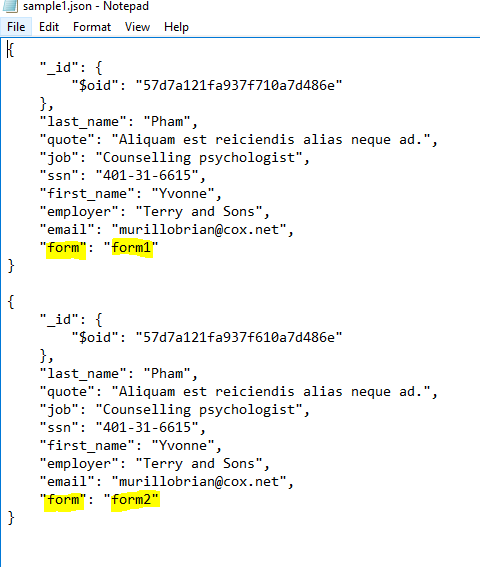
NoSQL databases do not rely on fixed tables like relational databases.
Instead, they store data in formats like:
- 📄 Documents (JSON-like)
- 🔑 Key–Value pairs
- 📊 Graphs
- 📦 Wide-column stores
Example (Document Style)
Instead of splitting user and orders into separate tables, you might store:
[
  {
    "name": "John",
    "orders": [
      { "product": "Laptop" },
      { "product": "Phone" }
    ]
  },
  {
    "name": "Alice",
    "orders": [
      { "product": "Tablet" },
      { "product": "Headphones" }
    ]
  }
]
✅ Popular NoSQL Database
- MongoDB
- Cassandra
When to Use NoSQL?
- Rapid development
- Flexible or changing data structure
- Large-scale systems
- Real-time apps
Basic Database Concepts
| Term | Meaning |
|---|---|
| Table | A collection of related data |
| Row | One record |
| Column | One field (attribute) |
| Primary Key | Unique ID for each row |
| Foreign Key | Links between tables |
| Query | A request for data |
SQL
SQL = Structured Query Language
It is the language used to interact with relational databases.
There are four main types of SQL operations (CRUD):
- Create →
INSERT - Read →
SELECT - Update →
UPDATE - Delete →
DELETE
Example Queries
SELECT * FROM students; --select all columns of student table

INSERT INTO students (name, age) VALUES ('Alice', 20); --insert value into the students table

UPDATE students SET age = 21 WHERE id = 1; --update age value whose id is 1

DELETE FROM students WHERE id = 1; --delete a row whose id is 1
Great 👍 let’s go deeper into each core concept so you truly understand how databases work — not just definitions, but how they behave in real systems.
📘 Basic Database Concepts (Explained Clearly & Deeply)
1️⃣ Table
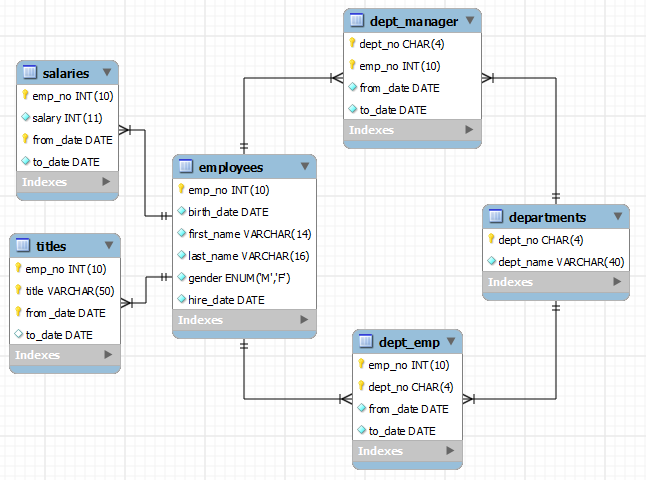
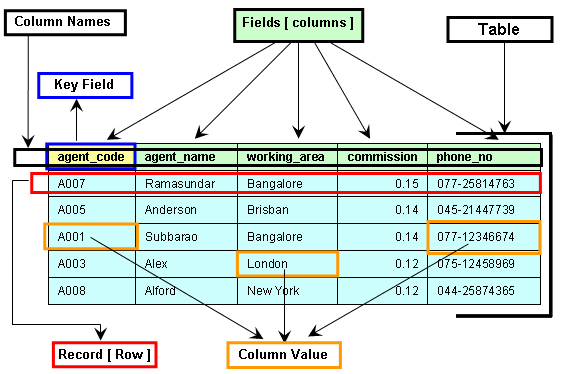


🔎 What It Really Is:
A table is a structured collection of related data stored in rows and columns.
Think of it like:
- An Excel sheet
- A grid
- A structured list of similar items
📌 Example:
A students table might store:
| id | name | age | email | | – | —- | — | —– |
🧠 Important Ideas:
- Each table stores one type of entity (students, users, products).
- Tables should not mix unrelated data.
- Good database design means keeping tables focused and organized.
2️⃣ Row (Record)
🔎 What It Really Is:
A row represents one complete entry in a table.
From the students table:
| id | name | age | |
|---|---|---|---|
| 1 | John | 20 | john@email.com |
That entire line is one row.
🧠 Important Ideas:
- One row = one real-world object.
- Each row should be uniquely identifiable.
- Rows grow as your system collects more data.
3️⃣ Column (Field / Attribute)
🔎 What It Really Is:
A column defines what type of data is stored.
In the students table:
id→ numbername→ textage→ numberemail→ text
🧠 Important Ideas:
- Columns define the structure (schema) of the table.
- Each column has a data type (INT, VARCHAR, DATE, etc.).
- Data types protect data integrity.
Example:
- Age should be a number.
- Email should be text.
4️⃣ Primary Key
🔑 What It Really Is:
A primary key is a column (or combination of columns) that uniquely identifies each row.
Example:
| id | name |
|---|---|
| 1 | John |
| 2 | Alice |
Here, id is the primary key.
📌 Rules of a Primary Key:
- Must be unique
- Cannot be NULL
- Only one primary key per table
🧠 Why It’s Important:
- Prevents duplicate records
- Helps databases find rows quickly
- Used to connect tables
Without primary keys, your database becomes messy and unreliable.
5️⃣ Foreign Key


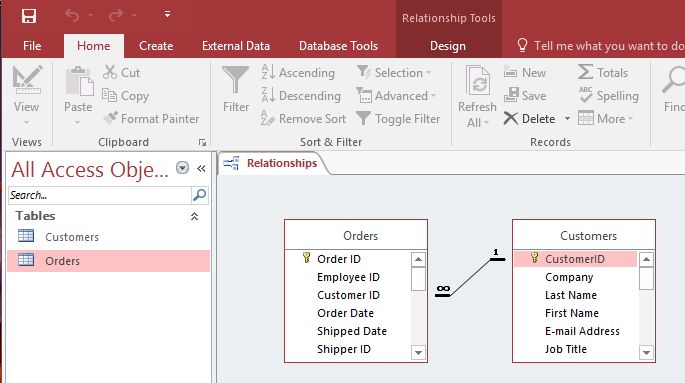
🔎 What It Really Is:
A foreign key is a column in one table that refers to the primary key in another table.
Example:
Users Table
| id | name |
|---|---|
| 1 | John |
Orders Table
| id | user_id | product |
|---|---|---|
| 1 | 1 | Laptop |
Here:
users.id→ Primary Keyorders.user_id→ Foreign Key
🧠 Why It Matters:
- Connects related data
- Maintains data integrity
- Prevents invalid relationships
Without foreign keys, you could create an order for a user that doesn’t exist.
6️⃣ Query
🔎 What It Really Is:
A query is a request sent to the database.
You use queries to:
- Retrieve data
- Insert data
- Update data
- Delete data
Example:
SELECT * FROM students;
This asks: 👉 “Give me all students.”
🧠 Types of Queries
- SELECT → Get data
- INSERT → Add data
- UPDATE → Modify data
- DELETE → Remove data
Together, these are called CRUD operations.
🔥 Bonus Concepts Beginners Should Also Know
📌 Schema
The blueprint of the database. It defines:
- Tables
- Columns
- Data types
- Relationships
📌 Index
Improves search speed.
Without index:
- Database scans every row (slow)
With index:
- Database jumps directly to the data (fast)
📌 Constraint
Rules applied to columns.
Examples:
- NOT NULL
- UNIQUE
- PRIMARY KEY
- FOREIGN KEY
Constraints protect your data.